
Sparkfun
SparkFun VoiceBox Shield - (AD5340)
SparkFun VoiceBox Shield - (AD5340)
Couldn't load pickup availability
Description:
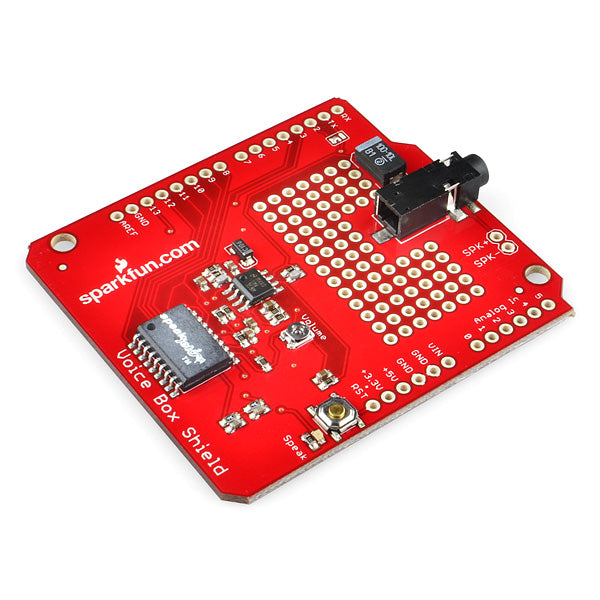
The SparkFun VoiceBox Shield can be mounted on top of your Arduino board to give it access to all of the capabilities of the SpeakJet voice and sound synthesizer. The Voice Box Shield uses the SpeakJet chip to convert serial commands into a great robot-sounding voice.
Populated on the VoiceBox Shield are the SpeakJet IC, a two-stage audio amplifier with a potentiometer to set the gain and a standard 3.5mm audio output jack. Simply connect a speaker to the output jack and get your Arduino-bot talking with very minimal work!
You can control the SpeakJet through either its serial line, or the eight event input lines which are connected to digital pins 5-12. A 3-way jumper allows you to connect either the software (D2) or hardware (D1) TX pin of the Arduino to the SpeakJet's serial input.
Also included on the shield are a grid of 0.1" through-hole prototyping area, as well as an Arduino reset button.
Documents:
- Schematic
- Eagle Files
- VoiceBox Shield Tutorial
- Listen to the SpeakJet! (YouTube)
- Talking Wireless Server Tutorial
- SpeakJet User’s Guide
- SpeakJet Dictionary
- Tutorial on adding the TTS256 text to speech IC to the shield
- Listen in MP3 Format as the VoiceBox Shield introduces itself
- GitHub
Share