

MicroJPM
ESP-01/01S 5V Relay Module V4.0 - (AD52982)
ESP-01/01S 5V Relay Module V4.0 - (AD52982)
Couldn't load pickup availability
Description:
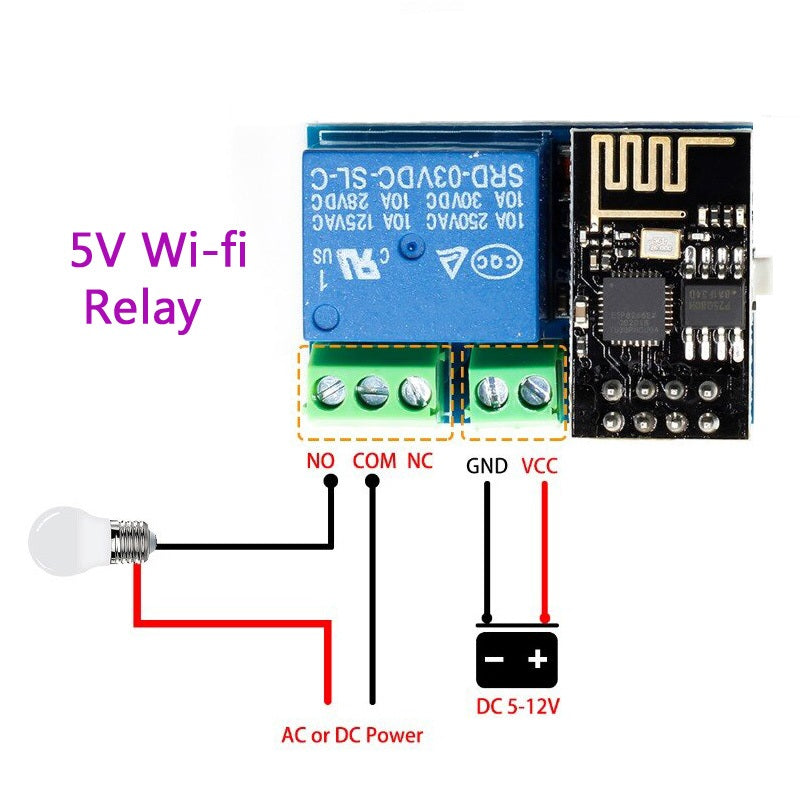
This is an ESP-01S relay module for the ESP8266, a smart Wi-Fi remote control switch for the home. It can be controlled via a smartphone (iPhone or Android) using the ESP8266 application. This product does NOT include the ESP8266.
Features:
- Transmission distance: The maximum transmission distance is 400m.
- Load: 10A@250VAC, 10A@30VDC, the relay switches 100,000 times.
- Note: Installation, configuration, and use of this Wi-Fi relay module require knowledge of electronics and IoT development.
- This Wi-Fi relay is based on the AI-Thinker ESP-01S Wi-Fi module. It is designed for smart homes, the Internet of Things, and other DIY projects. With this smart relay, you can easily create your smart switch to control any device with your phone from anywhere.
- The Wi-Fi relay module has two working modes.
- Size: 45 mm x 28 mm
- 5V power input
- The ESP8266 Wi-Fi module has three working modes: STA (client), AP (hotspot), STA + AP (hotspot + client).
- The module needs to be configured using serial debugging software and the USB to TTL module sends serial commands. The TX, RX, and GND pins of the USB to TTL module connect to the RX, TX, and GND pins of the ESP8266 relay module, and IN+ and IN- connect to DC5V.
- The default baud rate of the Wi-Fi module can be 115200 or 9600; you can send the AT command to change it, for example: AT + CIOBAUD = 115200. We recommend using 115200 under general conditions, but you should change it to 9600 when using a mobile phone to control the relay (because the baud rate of the STC15F104W MCU is 9600).
- The Wi-Fi relay module must be reconfigured if it restarts.
- The ESP8266 Wi-Fi module has a timeout mechanism. When the mobile phone has not sent commands to the ESP8266 Wi-Fi module for a period of time (the default is 180s), the ESP8266 Wi-Fi module will start your mobile phone. You can send AT + CIPSTO = on the PC to modify this time (time range 0-7200), for example: AT + CIPSTO = 3600.
- If it does not return OK and just returns the commands you sent when using "USR-TCP232-Test-V1.3" to configure the Wi-Fi module, you can press ENTER before sending commands.
Share