

MicroJPM
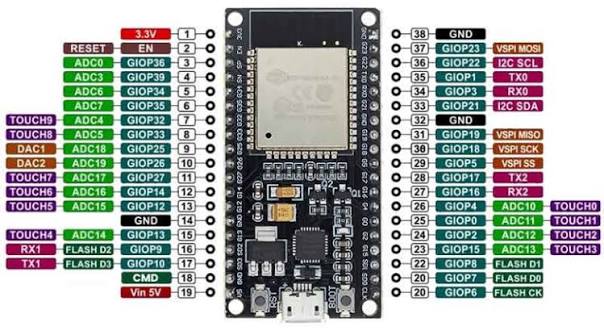
ESP-32 Development Board 2.4GHz Dual-Mode WiFi+Bluetooth - (AD42922)
ESP-32 Development Board 2.4GHz Dual-Mode WiFi+Bluetooth - (AD42922)
Couldn't load pickup availability
Description:
The ESP8266 started a small revolution by bringing WiFi to a small, cheap package that also had enough processing power and enough pins to do small things. Now get ready to take your shrunken WiFi capabilities to the next level with the ESP32 development board!
Firmware tips:
- Connect the micro USB directly from the computer to the board. Do not use a hub in between. Use a short cable.
- Install the ESP32 Arduino IDE add-on.
- Select ESP-32 Dev Module in the Arduino IDE.
- Put the ESP32 into boot mode by holding down the BOOT button and pressing and releasing the EN (reset) button.
- Select the serial port (if the serial port does not appear, make sure the CP2102 drivers are installed correctly).
- Start the download process. When the download begins, press and release the BOOT button again. The download process should now begin.
Specifications:
- ESP-32 module: ESP-WROOM-32 (ESP32-D0WDQ6 dual core)
- Built-in antenna
- Board size: 51 x 30mm.
- Micro USB
Share